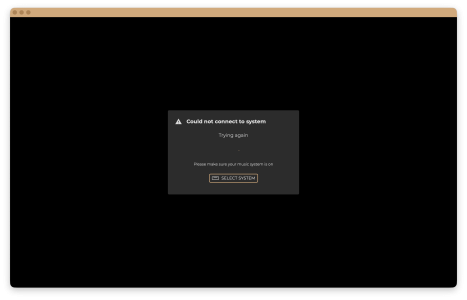
I’m not sure if this issue is related to the 3.3.5 Beta or the update to macOS 26.1. However, I’ve noticed that the local connection to InnuOS Sense in the Safari Browser (as well as in the Web App) can no longer be established (I am using a manually entered IP address). I’ve also tried the same with Chrome, and it works, but only after confirming that it’s a security risk. I suspect that this is because http:// instead of a secure https:// connection is used. my.innuos.com doesn’t work at all within Safari, but that’s not surprising since it never did. Perhaps the security bars have been raised higher? P.S. I have also tried with my AntiVirus app turned off, but this would not change anything.


In Progress Sense 3.4 Beta Testing
- Thread starter Stephen Healy
- Start date
You are using an out of date browser. It may not display this or other websites correctly.
You should upgrade or use an alternative browser.
You should upgrade or use an alternative browser.
In Progress

Another user was just discussing a similar matter in a prior thread - https://community.innuos.com/thread...ter-macos-update-to-tahoe-26-1.631/#post-4695I’m not sure if this issue is related to the 3.3.5 Beta or the update to macOS 26.1. However, I’ve noticed that the local connection to InnuOS Sense in the Safari Browser (as well as in the Web App) can no longer be established (I am using a manually entered IP address). I’ve also tried the same with Chrome, and it works, but only after confirming that it’s a security risk. I suspect that this is because http:// instead of a secure https:// connection is used. my.innuos.com doesn’t work at all within Safari, but that’s not surprising since it never did. Perhaps the security bars have been raised higher? P.S. I have also tried with my AntiVirus app turned off, but this would not change anything.
It appears to be a Safari issue specifically. As I mention there, I typically recommend using a browser like Chrome as it is generally far less prone to annoying bugs or changes reguarly compard to Safari.
I’m not sure if this issue is related to the 3.3.5 Beta or the update to macOS 26.1. However, I’ve noticed that the local connection to InnuOS Sense in the Safari Browser (as well as in the Web App) can no longer be established (I am using a manually entered IP address). I’ve also tried the same with Chrome, and it works, but only after confirming that it’s a security risk. I suspect that this is because http:// instead of a secure https:// connection is used. my.innuos.com doesn’t work at all within Safari, but that’s not surprising since it never did. Perhaps the security bars have been raised higher? P.S. I have also tried with my AntiVirus app turned off, but this would not change anything.
Sure, I can do. However, I was using the Web App all the time. Is it possible to use the updated protocols applied to the current iOS App Beta? It became definitely much more responsive.Another user was just discussing a similar matter in a prior thread - https://community.innuos.com/thread...ter-macos-update-to-tahoe-26-1.631/#post-4695
It appears to be a Safari issue specifically. As I mention there, I typically recommend using a browser like Chrome as it is generally far less prone to annoying bugs or changes reguarly compard to Safari.

It's a different set of criteria unfortunately - it will be quite a big undertaking to adapt to a non-HTTP browser but will be something we may have to look into in case more browsers choose to go this way.Sure, I can do. However, I was using the Web App all the time. Is it possible to use the updated protocols applied to the current iOS App Beta? It became definitely much more responsive.
Yes, we’ll see. Even with Chrome, you need to override some security settings. I reverted to the iPadOS App, which can be run on Apple Silicon Macs. It appears to work well. Perhaps it’s smarter and easier to ensure compatibility with macOS so that it can be used without any hassle.It's a different set of criteria unfortunately - it will be quite a big undertaking to adapt to a non-HTTP browser but will be something we may have to look into in case more browsers choose to go this way.
This is definitely a SmartQ problem and persists with Naim streamers using InnuOS 3.4.0-7. I have now disabled SmartQ, which is pity because it was otherwise working quite nicely with only the occasional cross-genre aberration.Quick bug report here on a Statement NG with Naim ND 555 and Naim Atom HE: when you stop in the middle of an album, the Statement will keep playing, skipping to the next track or starting SmartQ, even if you click stop multiple times. Selecting a new album and then clicking stop can result in the same thing. You have to click stop multiple times and it will eventually get the message. Even using the Naim remote to stop replay can have the same effect. Sometimes shutting down and restarting Sense helps. Sometimes it doesn't. A bit random.
On the plus side, my latest New Music albums were not lost in the update, whereas this happened consistently with the most recent previous versions.


Not sure if my experience 2 nights ago is related to the “keeps playing post”.
Zenith NG with i2s O/P board playing via Random play (SmartQ off) I accidentally hit either FF or backwards within a track whilst playing. I could not then stop the unit playing the song nor jump to the next track etc. basically the queue was continued no matter what I tried. In the end I had to hard power off the Zenith NG to get it to respond.
I haven’t tried to duplicate this because I don’t think powering down while the unit is functioning is not good for it. Please let me know if you want follow up?
Zenith NG with i2s O/P board playing via Random play (SmartQ off) I accidentally hit either FF or backwards within a track whilst playing. I could not then stop the unit playing the song nor jump to the next track etc. basically the queue was continued no matter what I tried. In the end I had to hard power off the Zenith NG to get it to respond.
I haven’t tried to duplicate this because I don’t think powering down while the unit is functioning is not good for it. Please let me know if you want follow up?
So to clarify, with SmartQ turned off you can now more consistently stop/pause the music whereas before it would be very difficult to stop?This is definitely a SmartQ problem and persists with Naim streamers using InnuOS 3.4.0-7. I have now disabled SmartQ, which is pity because it was otherwise working quite nicely with only the occasional cross-genre aberration.
This sounds somewhat similar to what @michaelb described in the post before you, although that was across SenseUPnP. Was the queue completely stuck, so you could not load other music into it to clear the queue and play something else? You may need to the 'Clear Queue Cache' in ADVANCED SETTINGS in your case @frank7036Not sure if my experience 2 nights ago is related to the “keeps playing post”.
Zenith NG with i2s O/P board playing via Random play (SmartQ off) I accidentally hit either FF or backwards within a track whilst playing. I could not then stop the unit playing the song nor jump to the next track etc. basically the queue was continued no matter what I tried. In the end I had to hard power off the Zenith NG to get it to respond.
I haven’t tried to duplicate this because I don’t think powering down while the unit is functioning is not good for it. Please let me know if you want follow up?
Unfortunately not. Even with SmartQ off, this persists. Switched it back on earlier today. When this problem happens (replay stopping and then the next track starting), you just have to flick through the tracks as they open, stopping replay as it goes and then quickly selecting a new track of your own choice and stopping replay.So to clarify, with SmartQ turned off you can now more consistently stop/pause the music whereas before it would be very difficult to stop?
Thank you Stephen, however In my case nothing I tried to change/stop the queue from playing worked. The unit was completely unresponsive to commands via the mobile Sense app, so your suggestion might not work.This sounds somewhat similar to what @michaelb described in the post before you, although that was across SenseUPnP. Was the queue completely stuck, so you could not load other music into it to clear the queue and play something else? You may need to the 'Clear Queue Cache' in ADVANCED SETTINGS in your case @frank7036
If the situation happens again I’ll post more detail here and leave it on in case Innuos could remote login…
With SenseUPnP at version 3.4.0-7 beta playing to Naim NSS33 streamer, I pressed pause in Sense but the streamer jumped to the next track played 40 seconds of that track and skipped on the next track. It repeated this to the end of the album and started to repeat from track 1, playing 40 seconds and skipping again.
The update to 3.4.0.8 went smoothly on my Statement NG.
I'm not sure if the new Naim UPnP profiles were supposed to resolve the pause/stop problem, but they have only partially improved things here.
If you play a single track, you can stop as well as pause and recommence sometimes.
Other times, the system will partially hang and no longer play although the progress bar may move when recommencing.
However, if you are playing an album, it will jump to the next track immediately after stopping - so virtually the same as before. It will not however jump to tracks on other albums and will stop if you are playing the last track on the album. So a small improvement there.
Another problem I have noted is that if I do not perform a back-up before installing an update, I will lose my recently added New Music. If this happens, performing a backup will, however, then restore the latest New Music.
HTH
Mike
I'm not sure if the new Naim UPnP profiles were supposed to resolve the pause/stop problem, but they have only partially improved things here.
If you play a single track, you can stop as well as pause and recommence sometimes.
Other times, the system will partially hang and no longer play although the progress bar may move when recommencing.
However, if you are playing an album, it will jump to the next track immediately after stopping - so virtually the same as before. It will not however jump to tracks on other albums and will stop if you are playing the last track on the album. So a small improvement there.
Another problem I have noted is that if I do not perform a back-up before installing an update, I will lose my recently added New Music. If this happens, performing a backup will, however, then restore the latest New Music.
HTH
Mike
Thanks for the feedback, Michael. Will relay this back.The update to 3.4.0.8 went smoothly on my Statement NG.
I'm not sure if the new Naim UPnP profiles were supposed to resolve the pause/stop problem, but they have only partially improved things here.
If you play a single track, you can stop as well as pause and recommence sometimes.
Other times, the system will partially hang and no longer play although the progress bar may move when recommencing.
However, if you are playing an album, it will jump to the next track immediately after stopping - so virtually the same as before. It will not however jump to tracks on other albums and will stop if you are playing the last track on the album. So a small improvement there.
Another problem I have noted is that if I do not perform a back-up before installing an update, I will lose my recently added New Music. If this happens, performing a backup will, however, then restore the latest New Music.
HTH
Mike
Regarding the missing 'New Music' after an update:The update to 3.4.0.8 went smoothly on my Statement NG.
I'm not sure if the new Naim UPnP profiles were supposed to resolve the pause/stop problem, but they have only partially improved things here.
If you play a single track, you can stop as well as pause and recommence sometimes.
Other times, the system will partially hang and no longer play although the progress bar may move when recommencing.
However, if you are playing an album, it will jump to the next track immediately after stopping - so virtually the same as before. It will not however jump to tracks on other albums and will stop if you are playing the last track on the album. So a small improvement there.
Another problem I have noted is that if I do not perform a back-up before installing an update, I will lose my recently added New Music. If this happens, performing a backup will, however, then restore the latest New Music.
HTH
Mike
- Does affect both the New Music widget on the HOME tab, as well as actual New Music category under the MUSIC tab?
- Do these become completely empty, or do the missing 'recent additions' seem to cut back to a certain date/time frame? So for example, all new music is missing that had been added since the last software update, or the last 7 days, etc?
Could you also let me know if after this update, you still have the correct 'badges' for the Naim devices on SenseUPnP? The latest beta update otherwise made no changes to the SenseUPnP profile, so realistically would not have expected any stability changes there.The update to 3.4.0.8 went smoothly on my Statement NG.
I'm not sure if the new Naim UPnP profiles were supposed to resolve the pause/stop problem, but they have only partially improved things here.
If you play a single track, you can stop as well as pause and recommence sometimes.
Other times, the system will partially hang and no longer play although the progress bar may move when recommencing.
However, if you are playing an album, it will jump to the next track immediately after stopping - so virtually the same as before. It will not however jump to tracks on other albums and will stop if you are playing the last track on the album. So a small improvement there.
Another problem I have noted is that if I do not perform a back-up before installing an update, I will lose my recently added New Music. If this happens, performing a backup will, however, then restore the latest New Music.
HTH
Mike
I have not noticed a new music issue on my Zenith...
However, I still have the issue that any restart of the Zenith will automatically start music playing on all my outputs, whether DAC connected by USB, LMS speakers on the network or UPnP connected Receivers/DACs... The same happens on individual players when I start them: for example when I turn on my USB-connected Devialet Expert Pro, it immediately continues to play whatever was playing before there, despite my having stopped the music there. Only radios may be exempt from restarting to play, but not sure. I will have to test. that again. Local and Qobuz tracks definitely start playing each time I restart either the Zenith or the amp/speakers/dac...
However, I still have the issue that any restart of the Zenith will automatically start music playing on all my outputs, whether DAC connected by USB, LMS speakers on the network or UPnP connected Receivers/DACs... The same happens on individual players when I start them: for example when I turn on my USB-connected Devialet Expert Pro, it immediately continues to play whatever was playing before there, despite my having stopped the music there. Only radios may be exempt from restarting to play, but not sure. I will have to test. that again. Local and Qobuz tracks definitely start playing each time I restart either the Zenith or the amp/speakers/dac...
Although I have not tested myself, you can try going into the LMS settings, then to PLAYER -> Audio and change the 'Power On Resume' mode, there are various options there including one that instructs the system to always stay paused/stopped after powering on, regardless of previous Now Playing status.I have not noticed a new music issue on my Zenith...
However, I still have the issue that any restart of the Zenith will automatically start music playing on all my outputs, whether DAC connected by USB, LMS speakers on the network or UPnP connected Receivers/DACs... The same happens on individual players when I start them: for example when I turn on my USB-connected Devialet Expert Pro, it immediately continues to play whatever was playing before there, despite my having stopped the music there. Only radios may be exempt from restarting to play, but not sure. I will have to test. that again. Local and Qobuz tracks definitely start playing each time I restart either the Zenith or the amp/speakers/dac...
That sounded like a good idea. However, I tried both the stay stopped at power on and the stay paused at power on, and neither had any effect. Upon turning on the players, they immediately start playing... It did not use to be the case...Although I have not tested myself, you can try going into the LMS settings, then to PLAYER -> Audio and change the 'Power On Resume' mode, there are various options there including one that instructs the system to always stay paused/stopped after powering on, regardless of previous Now Playing status.
Okay, thank you for the feedback - not sure why this would have suddenly begun occurring so will feed this back.That sounded like a good idea. However, I tried both the stay stopped at power on and the stay paused at power on, and neither had any effect. Upon turning on the players, they immediately start playing... It did not use to be the case...
Similar threads
- Replies
- 0
- Views
- 644
- Replies
- 0
- Views
- 74