Classical Mode: help needed!

Another way Innuos might approach this would be to mirror an existing source, such as the MusicBrainz Classical Style Guide, which provides clear documentation, guidance, and examples on implementation.
The problem with this is that many of us edit our music, moving tracks around in order to free them from the artificial strictures of traditional "Albums" (recordings) and discs. In fact, this is one of the great benefits of digital storage, allowing us to liberate our music from whatever "original state" the record companies chose (often for marketing purposes).

I happen to own quite a few "duplicate" copies of recordings: generally a newer remastering vs the original recording. Many of these "duplicates" differ in their track assignments, with the reissues having far more tracks than the originals (my classic example is Charles Dutoit's magnificent Daphnis et Chloë which has but a single track for the entire work!). So my point is that trying to have recording organised according to some online authority is doomed to fail at some point.

Now, whilst I entirely understand that some people might want to keep their music organised the same way as the physical item, the future is - whether we like it or not - one of downloads and/or online, and the concept of physical discs is going to fade fast.

So, if it's a choice of one or the other, I'd opt for the flexibility of "Album | Work | Movement" over "Disc | Track" any day (provided there's an automatic method of reassigning otherwise identical track numbers imported from multi-disc "albums").
 
Last edited:
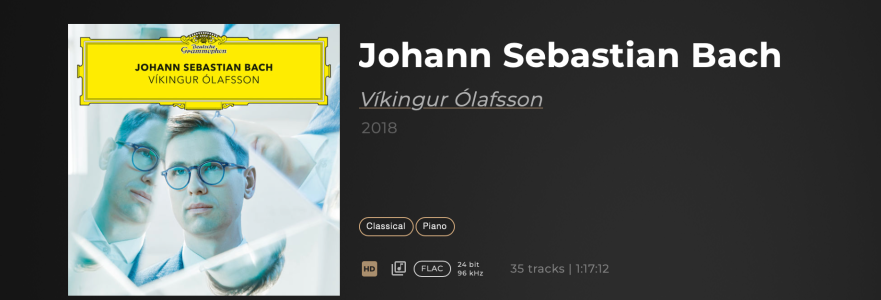
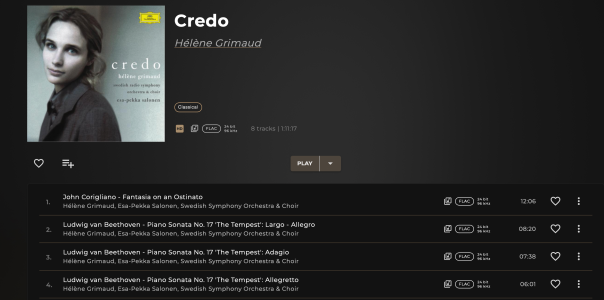
The best analogy for a classical music album is probably a concert, which may include several works by one or more composers that an artist will include in the same concert for a specific reason. Take an album such as "Johann Sebastian Bach" by Vikingur Olafsson revolving around music by JS Bach, but in the context of his contemporaries, or Hélène Grimaud's Credo around Arvo Part's Credo but with music by Beethoven and John Corigliano. Look at the Haydn 2032 series... All of those are putting works in context, just like in a concert. I don't want to have to put them back together, but I do want to recognize and play sometimes individually the works contained in those concerts. Other times I will want the concert as intended... But then I do need to see in "Now Playing" what is the work and who is the composer...
 

Attachments

  • Screenshot 2025-09-30 at 21.44.31.png
    Screenshot 2025-09-30 at 21.44.31.png
    675.1 KB · Views: 3
  • Screenshot 2025-09-30 at 22.01.49.png
    Screenshot 2025-09-30 at 22.01.49.png
    1 MB · Views: 3
The problem with this is that many of us edit our music, moving tracks around in order to free them from the artificial strictures of traditional "Albums" (recordings) and discs. In fact, this is one of the great benefits of digital storage, allowing us to liberate our music from whatever "original state" the record companies chose (often for marketing purposes).

I happen to own quite a few "duplicate" copies of recordings: generally a newer remastering vs the original recording. Many of these "duplicates" differ in their track assignments, with the reissues having far more tracks than the originals (my classic example is Charles Dutoit's magnificent Daphnis et Chloë which has but a single track for the entire work!). So my point is that trying to have recording organised according to some online authority is doomed to fail at some point.

Now, whilst I entirely understand that some people might want to keep their music organised the same way as the physical item, the future is - whether we like it or not - one of downloads and/or online, and the concept of physical discs is going to fade fast.

So, if it's a choice of one or the other, I'd opt for the flexibility of "Album | Work | Movement" over "Disc | Track" any day (provided there's an automatic method of reassigning otherwise identical track numbers imported from multi-disc "albums").
Discs/concerts/albums and works/movements are not incompatible: just as in a concert, there will be works and their respective movements, so we need both. I also agree though that the metadata from external database are often not satisfactory and therefore ostensibly of us will edit them in a way that suits us. I certainly do before importing any disc, and that is why I also ask for the ability to override Qobuz's metadata which is often wrong or simply has variations in spelling etc that do not work for me. Overriding Qobuz metadata would also allow for Qobuz releases that are in my library to be included in searches on composers or tracks which is currently impossible when added as whole albums.
 
It's not out of the question to keep the Disc level in - it's whether the experience would be cleaner and simpler by having them removed, otherwise it can get a bit text/detail heavy. I do know in some cases that actual names are sometimes assigned to individual discs, though this would also be tricky as there is not actually an ID3 tag to technically support this, it would be a level of detail unique/captive to the Sense database. I can see a use-case for this too!
I do not think that names for individual discs in a multi-disc set are necessary... It does not correspond to much...
 
The best analogy for a classical music album is probably a concert, which may include several works by one or more composers that an artist will include in the same concert for a specific reason. Take an album such as "Johann Sebastian Bach" by Vikingur Olafsson revolving around music by JS Bach, but in the context of his contemporaries, or Hélène Grimaud's Credo around Arvo Part's Credo but with music by Beethoven and John Corigliano. Look at the Haydn 2032 series... All of those are putting works in context, just like in a concert. I don't want to have to put them back together, but I do want to recognize and play sometimes individually the works contained in those concerts. Other times I will want the concert as intended... But then I do need to see in "Now Playing" what is the work and who is the composer...
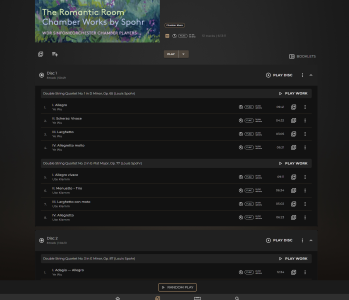
There would still be an option to 'Play Work' and a general 'Play' for the entire recording/album, I suppose the question is whether it's important to also have a 'Play Disc' level? Because that would be the main reason for dividing the album/recording down to a Disc level, and then to Works and its movements:
1759334461385.png
 
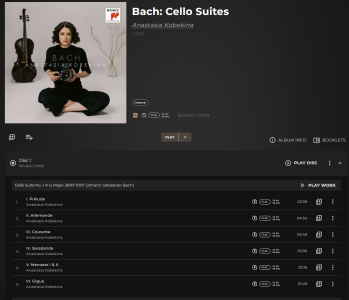
The Disc level at times can also be a little bemusing, taking this album as an example:

1759334571326.png

It does divide into 2 discs...but one of those is over 80 minutes long, so would not have actually fit on a typical CD. Plus its 24/96. So there is no correlation to a CD medium.
Each 'disc' contains 3 works, so that is 6 in total. So is there a benefit to having Disc 1 for Works 1-3, then Disc 2 for works 4-6? As opposed to just one Release with 6 Works in sequence? And let's assume composers can be assigned at a movement/work level, and does not have to be at an overall Recording level.
I'm sure we will reach a conclusion that is nice to have both options for different situations! And that might just have to be the balance we try to strike.
 
There would still be an option to 'Play Work' and a general 'Play' for the entire recording/album, I suppose the question is whether it's important to also have a 'Play Disc' level? Because that would be the main reason for dividing the album/recording down to a Disc level, and then to Works and its movements:
Hi Stephen, I really don't see any utility in "Play Disc" at all. Definitely useful to "Play Work" and a general "Play" though.
 
Thank you to those of you who submitted system logs after ripping Classical CDs! We have enough of these now, so will need no further submissions - much obliged to those who contributed.
I should have more news quite soon with an initial outline of how we plan to display a Classical album with the expanded metadata.
 
Hello everyone,

Thanks for your patience whilst we keep on working on Classical Mode!
I am happy to share some good news to share on this front.
As part of our development we have introduced a type of virtualisation or 'prototyping' for UI changes that we plan to implement, making it much easier to test out our ideas and planned changes.
Better yet, we can actually share these virtual mock-ups with everyone here on the forum, allowing you to take a first glimpse of the design we are working on.

Our first iterations are now live to give you an idea of how Classical Albums will be displayed in Sense:

Click here for virtual iPad demo

Click here for virtual iPhone demo

This will give you a sense of how information is displayed regarding composer, performer, grouping of movements into a work, reviews and credits of persons involved (where available).

Please feel free to give virtualisations a try and let us know your feedback! We're keen to hear if this is a step in the right direction and any other changes we may need to consider. The intention here is to pick up on a lot of the initial response that would normally come later only after beta versions have been installed. With this method above (which we would plan to use on major feature updates in the future) we can better define these things earlier on in the development process.

Enjoy!
 
Our first iterations are now live to give you an idea of how Classical Albums will be displayed in Sense:
Congratulations, Stephen: good to see the work/movement groupings!

I wasn't able to see whether there was the ability to see "composers" listed in a similar way to "artists". It would be good not to have to wade through thousands of albums and instead to have an overview of Composers, then drill down to their individual works/albums.

Were you also going to add artwork to "Folder View" ?
Best wishes,
David
 
I wasn't able to see whether there was the ability to see "composers" listed in a similar way to "artists". It would be good not to have to wade through thousands of albums and instead to have an overview of Composers, then drill down to their individual works/albums.
Do note this is technically already available under the ARTISTS tab, you just need to change the Sorting drop-down from the default 'Album Artists' to Composers, and then you will have a complete A-Z showing of all your Composers, where you can then click through to their associated releases. I do believe we're already considering adding more tabs to the Music page, of which Composer would be one.

Will need to enquire about any changes to the Folder View, I'm not currently aware of any changes on that front for the next feature update but it's still to be fully defined.