Volume control with Stream1 via Roon?

Kirk Wallace

New member
Dec 12, 2025
4
0
1
Oregon, USA
Currently I have an Innuos PulseMini acting as a Roon Endpoint in its Roon Bridge Mode. (My Roon core is a Nucleus One.) Roon has no trouble finding the PulseMini Zone and i can use the “Device Volume” setting and use the Roon sliders to control the volume on the speakers that the PulseMini serves. (The PulseMini is connected to an LTA Aero DAC which is connected to a CODA integrated amp. (The DAC has no output gain or volume control feature. The amp has no network connectivity).)

Question i have is whether anybody knows if the Innuos Stream1 or Stream3 will also be compatible with the Roon “Device Volume” setting or will i be forced to use DSP Volume (not good for SQ) or Fixed Volume (i.e., have to adjust volume directly at the amp)? (For comparison’s sake, for example, my Auerender N200 in a different set-up the also feeds a LTA Aero DAC can only operate in fixed volume as far as Roon is concerned.)

Thanks for any input you all may have.
 
Currently I have an Innuos PulseMini acting as a Roon Endpoint in its Roon Bridge Mode. (My Roon core is a Nucleus One.) Roon has no trouble finding the PulseMini Zone and i can use the “Device Volume” setting and use the Roon sliders to control the volume on the speakers that the PulseMini serves. (The PulseMini is connected to an LTA Aero DAC which is connected to a CODA integrated amp. (The DAC has no output gain or volume control feature. The amp has no network connectivity).)

Question i have is whether anybody knows if the Innuos Stream1 or Stream3 will also be compatible with the Roon “Device Volume” setting or will i be forced to use DSP Volume (not good for SQ) or Fixed Volume (i.e., have to adjust volume directly at the amp)? (For comparison’s sake, for example, my Auerender N200 in a different set-up the also feeds a LTA Aero DAC can only operate in fixed volume as far as Roon is concerned.)

Thanks for any input you all may have.
The STREAM series will be no different from the PULSEmini in terms of your options there.
In these types of setups, we generally recommend going fixed out to bypass DSP as much as possible, and use the volume control further down the chain (the amplifier).
 
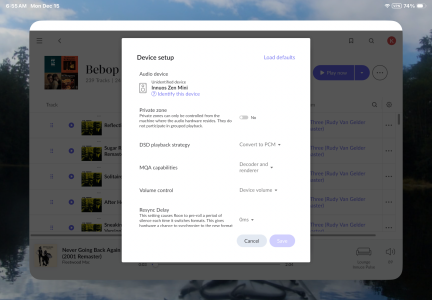
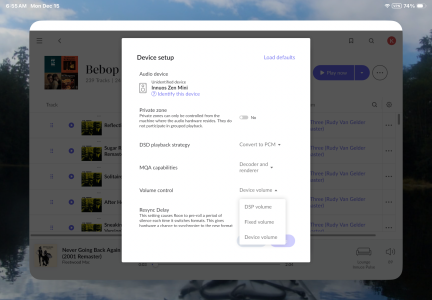
Thank you for the reply. I am confused by one aspect of it, though. I was trying not to use DSP and the DSP volume control at al, but your reply makes me wonder if that is what is happening even though it is not what is showing up on Roon. On the Roon device set up screen, I choose device volume, not DSP volume. (See screenshots.).

Thanks.
 

Attachments

  • IMG_0895.png
    IMG_0895.png
    2.4 MB · Views: 3
  • IMG_0894.png
    IMG_0894.png
    2.3 MB · Views: 3
DSP Volume is Roon handling volume control - but then this at odds with volume control on your amplifier.
Device Volume would defer it to the Innuos, but this is still a digital-domain volume control and not all that different - and is still at odds with volume control on your amplifier.
Fixed volume defeats all of these to be the most direct/passthrough and just allow your amplifier to control it, which will keep it in line with any other sources you have.

If you are not using Roon DSP anyway, then there is not really an inherent benefit to using Device Volume either - best to just go Fixed, I would say.
 
OK. Thanks a for the clarification. The benefit to my using the Roon device volume is that i can control the volume remotely. My amp is in a different room from the speakers so its IR remote is not effective for that.
 
OK. Thanks a for the clarification. The benefit to my using the Roon device volume is that i can control the volume remotely. My amp is in a different room from the speakers so its IR remote is not effective for that.
Ah okay, well in which case yes that would make it tricky! Makes sense to use DSP or Device volume then, I suspect there is not a great deal between them but you could try living with both of the options over the course of a few days and see if you can hear any difference