System Update 3.4.0 issue

Leopard

New member
Feb 24, 2025
5
0
1
United Kingdom
I have just downloaded the latest current system update. I have a Zen Mini Mk 3 and accompanying LPSU connected to my NAIM Uniti Star system. Until now any CD's I had ripped to the Innuos during playback displayed the album artwork (cover) on the NAIM display screen. Since the update I cannot now view the album covers of any ripped CD's. All I get is a quick note on the display screen "Streaming from LMS" which then changes to a symbol which I can only describe as looking like a car door! Has anyone else had this issue. I have switched off both the NAIM and the Innuos but still the same happens.
 
Hi @Leopard this may depend on what version of Sense you were previously updating from - we did make an overhaul to SenseUPnP that would account for this change, but this was quite a long time ago so you would have had to update from quite an older version of Sense.
The only thing I could suggest for the time being would be to go into the configuratiob section for SenseUPnP, try removing the Uniti Star as a player, then add it again - there should be an option to allow the displaying of artwork, so make sure this is enabled.
 
Hi @Leopard this may depend on what version of Sense you were previously updating from - we did make an overhaul to SenseUPnP that would account for this change, but this was quite a long time ago so you would have had to update from quite an older version of Sense.
The only thing I could suggest for the time being would be to go into the configuratiob section for SenseUPnP, try removing the Uniti Star as a player, then add it again - there should be an option to allow the displaying of artwork, so make sure this is enabled.
Hi Stephen, Thanks for your advice. I have removed and then added the Uniti Star on SenseUPnP, but still no artwork. Have checked through all the System Settings and Advanced Settings, but cannot find any option to enable artwork to be displayed, so guess will have to make do with being able to view it on the Sense App until any further update restores this. Thanks
 
Hi Stephen, Thanks for your advice. I have removed and then added the Uniti Star on SenseUPnP, but still no artwork. Have checked through all the System Settings and Advanced Settings, but cannot find any option to enable artwork to be displayed, so guess will have to make do with being able to view it on the Sense App until any further update restores this. Thanks
On the listing of your Naim streamer on the Audio page, you should see 3 dots to get more options which would show Configure Streamer:
1767623980489.png

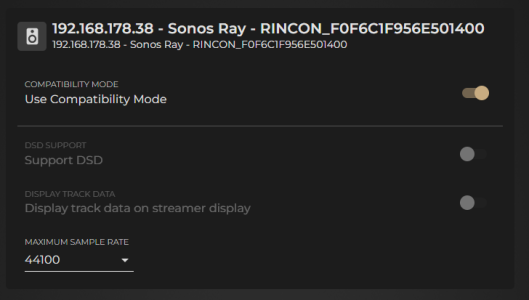
From here you have some options:
1767623998931.png

You can try taking Compatibility Mode off, and try enabling Display track data but at the moment I am not certain this will work. In any case, would suggest increasing the maximum sample rate to 192k.
 
On the listing of your Naim streamer on the Audio page, you should see 3 dots to get more options which would show Configure Streamer:
View attachment 596

From here you have some options:
View attachment 597

You can try taking Compatibility Mode off, and try enabling Display track data but at the moment I am not certain this will work. In any case, would suggest increasing the maximum sample rate to 192k.
Hi Stephen,
I can't seem to be able to access the Configure Streamer section from the Audio page of the Sense App. Please see attached screenshot. The name 'Lounge" refers to the fact that we had to give the Naim system a reference when originally setting this up, for multi-room purposes. When you click on the info next to the DISABLE button it then brings up details of the NAIM system, (Model, IP/MAC address) . Not sure if there is anything in the other settings on Sense that I need to do to be able to access the Configuration section.
 

Attachments

  • Screenshot_20260105_203852_Innuos Sense.jpg
    Screenshot_20260105_203852_Innuos Sense.jpg
    113.1 KB · Views: 3
Hi Stephen,
I can't seem to be able to access the Configure Streamer section from the Audio page of the Sense App. Please see attached screenshot. The name 'Lounge" refers to the fact that we had to give the Naim system a reference when originally setting this up, for multi-room purposes. When you click on the info next to the DISABLE button it then brings up details of the NAIM system, (Model, IP/MAC address) . Not sure if there is anything in the other settings on Sense that I need to do to be able to access the Configuration section.
Ah yes, this will be part of the new 'certified profile' that we devised for Naim streamers, good to know that the Uniti is identified that way too.
The cover art display has been difficult to get working since the last SenseUPnP overhaul, despite a few different beta versions and trials. We'll keep looking into it but the only alternative for now would be to revert to the Naim app as the control point for UPnP streaming, this should get give you the artwork and metadata displayed.