Understood. Option #4 would work for me, for both local and streaming services.Indeed Classical has further complexities, but with this comes the difficulty of how that works in the overall Sense library and how we do easily segragate these differences from non-Classical music. Option 2 does feel like this is the easier option, whereby if you wanted to listen to non-Classical music and did not want the clutter of the Composer etc on pop music then the 'Classical Mode' could just be disabled.
Keep in mind with Option 3 by having a per-album mode/switch, this would mean manually going through all your Classical albums and enabling it. The best thing we could do to try and automate this a bit more would be Option 4 where you could select specific existing tags in your library and instruct that any album with that tag should become a 'Classical' version specifically, but this does completely rely on quite a well-maintained tagging system on your files.


Classical Mode: help needed!
- Thread starter Stephen Healy
- Start date
You are using an out of date browser. It may not display this or other websites correctly.
You should upgrade or use an alternative browser.
You should upgrade or use an alternative browser.
Approx. 25% classical here -- I'm probably an outlierAlso worth pointing out that if you have an music library that is 100% Classical, or have only a tiny amount of non-Classical, then I think the no-brainer is just option 2 where by default we just immediately enable all albums with the expanded 'classical' data fields. For the handful of non-Classical albums you have, okay, you might get the Composer info listed more which may or may not be useful to you, that metadata could actually be edited and deleted if it was an annoyance.
It becomes more of a challenge with a large library where the balance is more 50:50 between Classical and non-Classical.
So let me put this another way with a more simple question; for the Classical users here with a keen interest in this Classical Mode, would you say that over 75% of your library is Classical?


Regarding the comment from @pending over on the Feature Request section with respect to too many tag checkboxes; I think this is a good point. Classical does come with a huge amount of potential 'sub genres' and any number of ways for further tagging, as further demonstrated by @cantorgale recent comment.
I suggested the idea to my dev team that perhaps some kind of toggle button here to group tags that are pre-defined as belonging to Classical could be enabled, so that all Classical-related tags get brought to the top of library filters in its own specialist sub-section, and away from all the non-Classical tags. We could have something similar in the main Genres & Tags tab too.
Would this be useful?
I suggested the idea to my dev team that perhaps some kind of toggle button here to group tags that are pre-defined as belonging to Classical could be enabled, so that all Classical-related tags get brought to the top of library filters in its own specialist sub-section, and away from all the non-Classical tags. We could have something similar in the main Genres & Tags tab too.
Would this be useful?
Yes that would be very good, but how would you handle “custom tags” say “Russian Opera” for example? Could we define subgenre as being “of the classical type” a bit like your idea of a switch”… Also please implement this together with the ability to override Qobuz tags
Yes, I was thinking 'Classical' as a tag would in fact just become a kind of umbrella or grouping for an entirely separate set of tags that all relate to the Classical genre as a whole, to which 'Russian Opera' would belong.Yes that would be very good, but how would you handle “custom tags” say “Russian Opera” for example? Could we define subgenre as being “of the classical type” a bit like your idea of a switch”… Also please implement this together with the ability to override Qobuz tags

The team has now updated the Figma mock ups with several new changes.
You can view them here: Updated Mock Ups
The main changes are as follows:
• The position of the Composer at album header level
• The position and size of the label information
• How we show or hide artists at track level.
In this new approach, we only hide artists and composers if they are exactly the same across all tracks within an album or work. For example:
• If the performer is the same for all tracks but the composer differs, we show both the artist and the composer on every track.
• If the composer is the same for all tracks but the performer differs, we show the composer at header level and the artists on each track.
• If there is a common performer, such as an ensemble, across all tracks and different soloists on some tracks, we show both the ensemble and the soloist on all tracks.
We have also included additional use cases to cover these scenarios, as well as a new example showing an album where only some of the tracks are associated with a work
Look forward to seeing your thoughts
You can view them here: Updated Mock Ups
The main changes are as follows:
• The position of the Composer at album header level
• The position and size of the label information
• How we show or hide artists at track level.
In this new approach, we only hide artists and composers if they are exactly the same across all tracks within an album or work. For example:
• If the performer is the same for all tracks but the composer differs, we show both the artist and the composer on every track.
• If the composer is the same for all tracks but the performer differs, we show the composer at header level and the artists on each track.
• If there is a common performer, such as an ensemble, across all tracks and different soloists on some tracks, we show both the ensemble and the soloist on all tracks.
We have also included additional use cases to cover these scenarios, as well as a new example showing an album where only some of the tracks are associated with a work
Look forward to seeing your thoughts
Thanks for these new mockups.The team has now updated the Figma mock ups with several new changes.
You can view them here: Updated Mock Ups
The main changes are as follows:
• The position of the Composer at album header level
• The position and size of the label information
• How we show or hide artists at track level.
In this new approach, we only hide artists and composers if they are exactly the same across all tracks within an album or work. For example:
• If the performer is the same for all tracks but the composer differs, we show both the artist and the composer on every track.
• If the composer is the same for all tracks but the performer differs, we show the composer at header level and the artists on each track.
• If there is a common performer, such as an ensemble, across all tracks and different soloists on some tracks, we show both the ensemble and the soloist on all tracks.
We have also included additional use cases to cover these scenarios, as well as a new example showing an album where only some of the tracks are associated with a work
Look forward to seeing your thoughts
First reactions:
- the Composer name looks a bit small in the main display
- the "by" in front of the composer is a bit strange... I would just put the name...
- The display of artists and composers at track level is good in general. There is no example of the different composers by works as only the Nuits de Paris has multiple composers but those are at track level. I assume that if you had pianos concertos by say Prokofiev and Shostakovich, the composers' names would appear at the Work level?
- the line separating the "independent" tracks from those included in a works is good.
1. the Composer name looks a bit small in the main displayThanks for these new mockups.
First reactions:
- the Composer name looks a bit small in the main display
- the "by" in front of the composer is a bit strange... I would just put the name...
- The display of artists and composers at track level is good in general. There is no example of the different composers by works as only the Nuits de Paris has multiple composers but those are at track level. I assume that if you had pianos concertos by say Prokofiev and Shostakovich, the composers' names would appear at the Work level?
- the line separating the "independent" tracks from those included in a works is good.
We can think about making it a bit bigger perhaps.
2. the "by" in front of the composer is a bit strange... I would just put the name...
Our rationale behind this was to make it very easily discernable, especially in regards to non classical music. Perhaps "Composed by:" instead?
3. The display of artists and composers at track level is good in general. There is no example of the different composers by works as only the Nuits de Paris has multiple composers but those are at track level. I assume that if you had pianos concertos by say Prokofiev and Shostakovich, the composers' names would appear at the Work level?
No example of this yet no, but Composers would appear at the work level, below the work title.
or simply "Composer(s):"1. the Composer name looks a bit small in the main display
We can think about making it a bit bigger perhaps.
2. the "by" in front of the composer is a bit strange... I would just put the name...
Our rationale behind this was to make it very easily discernable, especially in regards to non classical music. Perhaps "Composed by:" instead?
3. The display of artists and composers at track level is good in general. There is no example of the different composers by works as only the Nuits de Paris has multiple composers but those are at track level. I assume that if you had pianos concertos by say Prokofiev and Shostakovich, the composers' names would appear at the Work level?
No example of this yet no, but Composers would appear at the work level, below the work title.
Thank you for posting these, very helpful!The team has now updated the Figma mock ups with several new changes.
You can view them here: Updated Mock Ups
The main changes are as follows:
• The position of the Composer at album header level
• The position and size of the label information
• How we show or hide artists at track level.
In this new approach, we only hide artists and composers if they are exactly the same across all tracks within an album or work. For example:
• If the performer is the same for all tracks but the composer differs, we show both the artist and the composer on every track.
• If the composer is the same for all tracks but the performer differs, we show the composer at header level and the artists on each track.
• If there is a common performer, such as an ensemble, across all tracks and different soloists on some tracks, we show both the ensemble and the soloist on all tracks.
We have also included additional use cases to cover these scenarios, as well as a new example showing an album where only some of the tracks are associated with a work
Look forward to seeing your thoughts
I agree with guardajoias re using the label "Composer" instead of "By".
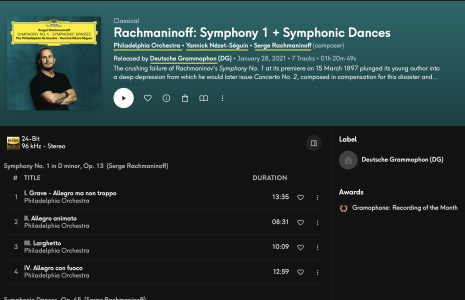
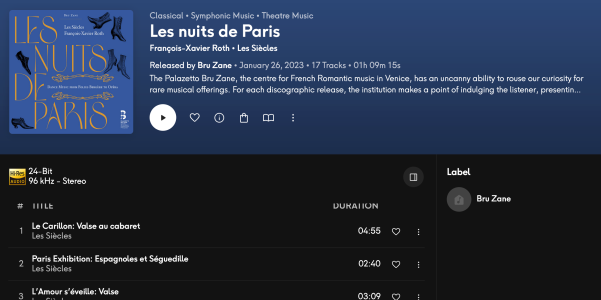
In the album view, I like that the composer and performers' names are hyperlinked, but must this occur from inside a popup window? In other words, could they simply be linked directly from the album page? This is how it works on Qobuz, as shown below. In the screenshot I've underlined the linked names in yellow.
Attachments
Similar threads
- Replies
- 0
- Views
- 174
- Replies
- 4
- Views
- 465